Speeding up Inference
Sentence Transformers supports 3 backends for computing multi-vector embeddings with Multi-Vector Encoder models, each with its own optimizations for speeding up inference:
PyTorch
The PyTorch backend is the default backend for Multi-Vector Encoders. If you don’t specify a device, it will use the strongest available option across “cuda”, “mps”, and “cpu”. Its default usage looks like this:
from sentence_transformers import MultiVectorEncoder

model = MultiVectorEncoder("mixedbread-ai/mxbai-edge-colbert-v0-32m")

queries = ["What is the capital of France?"]
documents = [
    "Paris is the capital of France.",
    "Berlin is the capital of Germany.",
]

query_embeddings = model.encode_query(queries)
document_embeddings = model.encode_document(documents)

scores = model.similarity(query_embeddings, document_embeddings)
print(scores)
# tensor([[10.6578, 10.4499]])
If you’re using a GPU, then you can use the following options to speed up your inference:
Float32 (fp32, full precision) is the default floating-point format in torch, whereas float16 (fp16, half precision) is a reduced-precision floating-point format that can speed up inference on GPUs at a minimal loss of model accuracy. To use it, you can specify the torch_dtype during initialization or call model.half() on the initialized model:
from sentence_transformers import MultiVectorEncoder

model = MultiVectorEncoder("mixedbread-ai/mxbai-edge-colbert-v0-32m", model_kwargs={"torch_dtype": "float16"})
# or: model.half()

documents = [
    "Paris is the capital of France.",
    "Berlin is the capital of Germany.",
]
document_embeddings = model.encode_document(documents)
Bfloat16 (bf16) is similar to fp16, but preserves more of the original accuracy of fp32. To use it, you can specify the torch_dtype during initialization or call model.bfloat16() on the initialized model:
from sentence_transformers import MultiVectorEncoder

model = MultiVectorEncoder("mixedbread-ai/mxbai-edge-colbert-v0-32m", model_kwargs={"torch_dtype": "bfloat16"})
# or: model.bfloat16()

documents = [
    "Paris is the capital of France.",
    "Berlin is the capital of Germany.",
]
document_embeddings = model.encode_document(documents)
Flash Attention is an efficient attention implementation that can significantly speed up inference on GPUs. When flash attention with variable-length support is available, Sentence Transformers automatically skips padding for text-only inputs by concatenating them into a single sequence. This is especially beneficial for Multi-Vector Encoders, as documents are only truncated (not padded) to a shared length, so batch lengths vary widely.
To use flash attention, specify attn_implementation="flash_attention_2" in model_kwargs. Flash attention can be installed
via pip install kernels, which provides flash attention support without needing the flash-attn package, or alternatively
via pip install flash-attn. In our benchmarks below, combining it with fp16 was the fastest configuration measured
(2.44x over fp32) at no loss of retrieval quality:
from sentence_transformers import MultiVectorEncoder

model = MultiVectorEncoder(
    "lightonai/GTE-ModernColBERT-v1",
    model_kwargs={"attn_implementation": "flash_attention_2", "torch_dtype": "float16"},
)

documents = [
    "Paris is the capital of France.",
    "Berlin is the capital of Germany.",
]
document_embeddings = model.encode_document(documents)
Warning
Models with non-attend query expansion (attend=False, e.g. Stanford-NLP checkpoints like
colbert-ir/colbertv2.0 and answerdotai/answerai-colbert-small-v1) reject Flash Attention at load
time: Flash Attention strips attention_mask=0 positions, so the [MASK] expansion tokens used by
MaxSim would never receive an attention update. For those models, use "sdpa" (preserves semantics) or
switch the model to query_expansion={..., "attend": True} (changes semantics, requires re-evaluation).
Models with attend=True expansion (e.g. lightonai/GTE-ModernColBERT-v1) work with Flash Attention
out of the box.
Input unpadding can be controlled via unpad_inputs
on the underlying Transformer module:
model[0].unpad_inputs = False   # Force padding
model[0].unpad_inputs = True    # Explicitly request unpadding
model[0].unpad_inputs = None    # Auto-detect (default)
Input flattening also speeds up training. When training with
CachedMultiVectorMultipleNegativesRankingLoss, you can
set mini_batch_num_tokens instead of mini_batch_size: mini-batches are then packed by total token count
rather than by sequence count, so every mini-batch performs a similar amount of work and uses a similar, predictable
amount of memory, regardless of how sequence lengths are distributed within the batch.
model.compile() wraps the model’s forward pass with
torch.compile(). Whether it helps depends strongly on the model and hardware: the benefit grows with model
size, and very small models on a fast GPU can see little gain or even a slight slowdown, since their inference is
dominated by tokenization and Python overhead. Always measure on your own model, hardware, and inputs. It composes
with the fp16/bf16 options above.
from sentence_transformers import MultiVectorEncoder

model = MultiVectorEncoder("mixedbread-ai/mxbai-edge-colbert-v0-32m", model_kwargs={"torch_dtype": "bfloat16"})
model.compile(dynamic=True)

documents = [
    "Paris is the capital of France.",
    "Berlin is the capital of Germany.",
]
document_embeddings = model.encode_document(documents)
dynamic=True enables dynamic shapes so a compiled graph can handle variable sequence lengths, reducing
recompilation when your inputs vary in length. This matters more for Multi-Vector Encoders than for single-vector
models, as documents are only truncated (not padded) to a shared length. Compilation is lazy, so warm the model up
on representative inputs before benchmarking or serving.
ONNX
ONNX can be used to speed up inference by converting the model to ONNX format and using ONNX Runtime to run the model. To use the ONNX backend, you must install Sentence Transformers with the onnx or onnx-gpu extra for CPU or GPU acceleration, respectively:
pip install sentence-transformers[onnx-gpu]
# or
pip install sentence-transformers[onnx]
To convert a model to ONNX format, you can use the following code:
from sentence_transformers import MultiVectorEncoder

model = MultiVectorEncoder("mixedbread-ai/mxbai-edge-colbert-v0-32m", backend="onnx")

queries = ["What is the capital of France?"]
documents = [
    "Paris is the capital of France.",
    "Berlin is the capital of Germany.",
]

query_embeddings = model.encode_query(queries)
document_embeddings = model.encode_document(documents)

scores = model.similarity(query_embeddings, document_embeddings)
print(scores)
# tensor([[10.6578, 10.4499]])
If the model path or repository already contains a model in ONNX format, Sentence Transformers will automatically use it. Otherwise, it will convert the model to the ONNX format.
Note
The ONNX export only converts the Transformer component, which outputs contextualized token embeddings. The remaining pipeline modules (the projection to the multi-vector dimension, the scoring mask, and the token-level normalization) run in PyTorch on top of it, and the query/document length caps and query expansion are applied during tokenization. As a result, all backends produce identical embeddings, but if you wish to use the ONNX model outside of Sentence Transformers, you’ll need to apply those steps yourself.
All keyword arguments passed via model_kwargs will be passed on to ORTModel.from_pretrained. Some notable arguments include:
provider: ONNX Runtime provider to use for loading the model, e.g."CPUExecutionProvider". See https://onnxruntime.ai/docs/execution-providers/ for possible providers. If not specified, the strongest provider (E.g."CUDAExecutionProvider") will be used.file_name: The name of the ONNX file to load. If not specified, will default to"model.onnx"or otherwise"onnx/model.onnx". This argument is useful for specifying optimized or quantized models.export: A boolean flag specifying whether the model will be exported. If not provided,exportwill be set toTrueif the model repository or directory does not already contain an ONNX model.
Tip
It’s heavily recommended to save the exported model to prevent having to re-export it every time you run your code. You can do this by calling model.save_pretrained() if your model was local:
model = MultiVectorEncoder("path/to/my/model", backend="onnx")
model.save_pretrained("path/to/my/model")
or with model.push_to_hub() if your model was from the Hugging Face Hub:
model = MultiVectorEncoder("mixedbread-ai/mxbai-edge-colbert-v0-32m", backend="onnx")
model.push_to_hub("mixedbread-ai/mxbai-edge-colbert-v0-32m", create_pr=True)
Optimizing ONNX Models
ONNX models can be optimized using Optimum, allowing for speedups on CPUs and GPUs alike. To do this, you can use the export_optimized_onnx_model() function, which saves the optimized in a directory or model repository that you specify. It expects:
model: a Sentence Transformer, Sparse Encoder, Cross Encoder, or Multi-Vector Encoder model loaded with the ONNX backend.optimization_config:"O1","O2","O3", or"O4"representing optimization levels fromAutoOptimizationConfig, or anOptimizationConfiginstance.model_name_or_path: a path to save the optimized model file, or the repository name if you want to push it to the Hugging Face Hub.push_to_hub: (Optional) a boolean to push the optimized model to the Hugging Face Hub.create_pr: (Optional) a boolean to create a pull request when pushing to the Hugging Face Hub. Useful when you don’t have write access to the repository.file_suffix: (Optional) a string to append to the model name when saving it. If not specified, the optimization level name string will be used, or just"optimized"if the optimization config was not just a string optimization level.
See this example for exporting a model with optimization level 3 (basic and extended general optimizations, transformers-specific fusions, fast Gelu approximation):
Only optimize once:
from sentence_transformers import MultiVectorEncoder, export_optimized_onnx_model

model = MultiVectorEncoder("mixedbread-ai/mxbai-edge-colbert-v0-32m", backend="onnx")
export_optimized_onnx_model(
    model=model,
    optimization_config="O3",
    model_name_or_path="mixedbread-ai/mxbai-edge-colbert-v0-32m",
    push_to_hub=True,
    create_pr=True,
)
Before the pull request gets merged:
from sentence_transformers import MultiVectorEncoder

pull_request_nr = 2 # NOTE: Update this to the number of your pull request
model = MultiVectorEncoder(
    "mixedbread-ai/mxbai-edge-colbert-v0-32m",
    backend="onnx",
    model_kwargs={"file_name": "onnx/model_O3.onnx"},
    revision=f"refs/pr/{pull_request_nr}"
)
Once the pull request gets merged:
from sentence_transformers import MultiVectorEncoder

model = MultiVectorEncoder(
    "mixedbread-ai/mxbai-edge-colbert-v0-32m",
    backend="onnx",
    model_kwargs={"file_name": "onnx/model_O3.onnx"},
)
Only optimize once:
from sentence_transformers import MultiVectorEncoder, export_optimized_onnx_model

model = MultiVectorEncoder("path/to/my/colbert-legal-finetuned", backend="onnx")
export_optimized_onnx_model(
    model=model, optimization_config="O3", model_name_or_path="path/to/my/colbert-legal-finetuned"
)
After optimizing:
from sentence_transformers import MultiVectorEncoder

model = MultiVectorEncoder(
    "path/to/my/colbert-legal-finetuned",
    backend="onnx",
    model_kwargs={"file_name": "onnx/model_O3.onnx"},
)
Quantizing ONNX Models
ONNX models can be quantized to int8 precision using Optimum, allowing for faster inference on CPUs. To do this, you can use the export_dynamic_quantized_onnx_model() function, which saves the quantized in a directory or model repository that you specify. Dynamic quantization, unlike static quantization, does not require a calibration dataset. It expects:
model: a Sentence Transformer, Sparse Encoder, Cross Encoder, or Multi-Vector Encoder model loaded with the ONNX backend.quantization_config:"arm64","avx2","avx512", or"avx512_vnni"representing quantization configurations fromAutoQuantizationConfig, or anQuantizationConfiginstance.model_name_or_path: a path to save the quantized model file, or the repository name if you want to push it to the Hugging Face Hub.push_to_hub: (Optional) a boolean to push the quantized model to the Hugging Face Hub.create_pr: (Optional) a boolean to create a pull request when pushing to the Hugging Face Hub. Useful when you don’t have write access to the repository.file_suffix: (Optional) a string to append to the model name when saving it. If not specified,"qint8_quantized"will be used.
See this example for quantizing a model to int8 with avx512_vnni:
Only quantize once:
from sentence_transformers import MultiVectorEncoder, export_dynamic_quantized_onnx_model

model = MultiVectorEncoder("mixedbread-ai/mxbai-edge-colbert-v0-32m", backend="onnx")
export_dynamic_quantized_onnx_model(
    model=model,
    quantization_config="avx512_vnni",
    model_name_or_path="mixedbread-ai/mxbai-edge-colbert-v0-32m",
    push_to_hub=True,
    create_pr=True,
)
Before the pull request gets merged:
from sentence_transformers import MultiVectorEncoder

pull_request_nr = 2 # NOTE: Update this to the number of your pull request
model = MultiVectorEncoder(
    "mixedbread-ai/mxbai-edge-colbert-v0-32m",
    backend="onnx",
    model_kwargs={"file_name": "onnx/model_qint8_avx512_vnni.onnx"},
    revision=f"refs/pr/{pull_request_nr}",
)
Once the pull request gets merged:
from sentence_transformers import MultiVectorEncoder

model = MultiVectorEncoder(
    "mixedbread-ai/mxbai-edge-colbert-v0-32m",
    backend="onnx",
    model_kwargs={"file_name": "onnx/model_qint8_avx512_vnni.onnx"},
)
Only quantize once:
from sentence_transformers import MultiVectorEncoder, export_dynamic_quantized_onnx_model

model = MultiVectorEncoder("path/to/my/colbert-legal-finetuned", backend="onnx")
export_dynamic_quantized_onnx_model(
    model=model, quantization_config="avx512_vnni", model_name_or_path="path/to/my/colbert-legal-finetuned"
)
After quantizing:
from sentence_transformers import MultiVectorEncoder

model = MultiVectorEncoder(
    "path/to/my/colbert-legal-finetuned",
    backend="onnx",
    model_kwargs={"file_name": "onnx/model_qint8_avx512_vnni.onnx"},
)
OpenVINO
OpenVINO allows for accelerated inference on CPUs by exporting the model to the OpenVINO format. To use the OpenVINO backend, you must install Sentence Transformers with the openvino extra:
pip install sentence-transformers[openvino]
To convert a model to OpenVINO format, you can use the following code:
from sentence_transformers import MultiVectorEncoder

model = MultiVectorEncoder("answerdotai/answerai-colbert-small-v1", backend="openvino")

queries = ["What is the capital of France?"]
documents = [
    "Paris is the capital of France.",
    "Berlin is the capital of Germany.",
]

query_embeddings = model.encode_query(queries)
document_embeddings = model.encode_document(documents)

scores = model.similarity(query_embeddings, document_embeddings)
print(scores)
# tensor([[31.4515, 30.8991]])
If the model path or repository already contains a model in OpenVINO format, Sentence Transformers will automatically use it. Otherwise, it will convert the model to the OpenVINO format.
Note
The OpenVINO exporter from Optimum Intel does not support every architecture yet. Notably, ModernBERT-based models (e.g. lightonai/GTE-ModernColBERT-v1 and mixedbread-ai/mxbai-edge-colbert-v0-32m) cannot currently be exported to OpenVINO, which is why this section uses a BERT-based checkpoint. The ONNX backend does support these architectures.
Note
The OpenVINO export only converts the Transformer component, which outputs contextualized token embeddings. The remaining pipeline modules (the projection to the multi-vector dimension, the scoring mask, and the token-level normalization) run in PyTorch on top of it, and the query/document length caps and query expansion are applied during tokenization. As a result, all backends produce identical embeddings, but if you wish to use the OpenVINO model outside of Sentence Transformers, you’ll need to apply those steps yourself.
model_kwargs will be passed on to OVBaseModel.from_pretrained(). Some notable arguments include:file_name: The name of the OpenVINO file to load. If not specified, will default to"openvino_model.xml"or otherwise"openvino/openvino_model.xml". This argument is useful for specifying optimized or quantized models.export: A boolean flag specifying whether the model will be exported. If not provided,exportwill be set toTrueif the model repository or directory does not already contain an OpenVINO model.
Tip
It’s heavily recommended to save the exported model to prevent having to re-export it every time you run your code. You can do this by calling model.save_pretrained() if your model was local:
model = MultiVectorEncoder("path/to/my/model", backend="openvino")
model.save_pretrained("path/to/my/model")
or with model.push_to_hub() if your model was from the Hugging Face Hub:
model = MultiVectorEncoder("answerdotai/answerai-colbert-small-v1", backend="openvino")
model.push_to_hub("answerdotai/answerai-colbert-small-v1", create_pr=True)
Quantizing OpenVINO Models
OpenVINO models can be quantized to int8 precision using Optimum Intel to speed up inference.
To do this, you can use the export_static_quantized_openvino_model() function,
which saves the quantized model in a directory or model repository that you specify.
Post-Training Static Quantization expects:
model: a Sentence Transformer, Sparse Encoder, Cross Encoder, or Multi-Vector Encoder model loaded with the OpenVINO backend.quantization_config: (Optional) The quantization configuration. This parameter accepts either:Nonefor the default 8-bit quantization, a dictionary representing quantization configurations, or anOVQuantizationConfiginstance.model_name_or_path: a path to save the quantized model file, or the repository name if you want to push it to the Hugging Face Hub.dataset_name: (Optional) The name of the dataset to load for calibration. If not specified, defaults tosst2subset from thegluedataset.dataset_config_name: (Optional) The specific configuration of the dataset to load.dataset_split: (Optional) The split of the dataset to load (e.g., ‘train’, ‘test’).column_name: (Optional) The column name in the dataset to use for calibration.push_to_hub: (Optional) a boolean to push the quantized model to the Hugging Face Hub.create_pr: (Optional) a boolean to create a pull request when pushing to the Hugging Face Hub. Useful when you don’t have write access to the repository.file_suffix: (Optional) a string to append to the model name when saving it. If not specified,"qint8_quantized"will be used.
See this example for quantizing a model to int8 with static quantization:
Only quantize once:
from sentence_transformers import MultiVectorEncoder, export_static_quantized_openvino_model

model = MultiVectorEncoder("answerdotai/answerai-colbert-small-v1", backend="openvino")
export_static_quantized_openvino_model(
    model=model,
    quantization_config=None,
    model_name_or_path="answerdotai/answerai-colbert-small-v1",
    push_to_hub=True,
    create_pr=True,
)
Before the pull request gets merged:
from sentence_transformers import MultiVectorEncoder

pull_request_nr = 2 # NOTE: Update this to the number of your pull request
model = MultiVectorEncoder(
    "answerdotai/answerai-colbert-small-v1",
    backend="openvino",
    model_kwargs={"file_name": "openvino/openvino_model_qint8_quantized.xml"},
    revision=f"refs/pr/{pull_request_nr}"
)
Once the pull request gets merged:
from sentence_transformers import MultiVectorEncoder

model = MultiVectorEncoder(
    "answerdotai/answerai-colbert-small-v1",
    backend="openvino",
    model_kwargs={"file_name": "openvino/openvino_model_qint8_quantized.xml"},
)
Only quantize once:
from sentence_transformers import MultiVectorEncoder, export_static_quantized_openvino_model
from optimum.intel import OVQuantizationConfig

model = MultiVectorEncoder("path/to/my/colbert-legal-finetuned", backend="openvino")
quantization_config = OVQuantizationConfig()
export_static_quantized_openvino_model(
    model=model, quantization_config=quantization_config, model_name_or_path="path/to/my/colbert-legal-finetuned"
)
After quantizing:
from sentence_transformers import MultiVectorEncoder

model = MultiVectorEncoder(
    "path/to/my/colbert-legal-finetuned",
    backend="openvino",
    model_kwargs={"file_name": "openvino/openvino_model_qint8_quantized.xml"},
)
Benchmarks
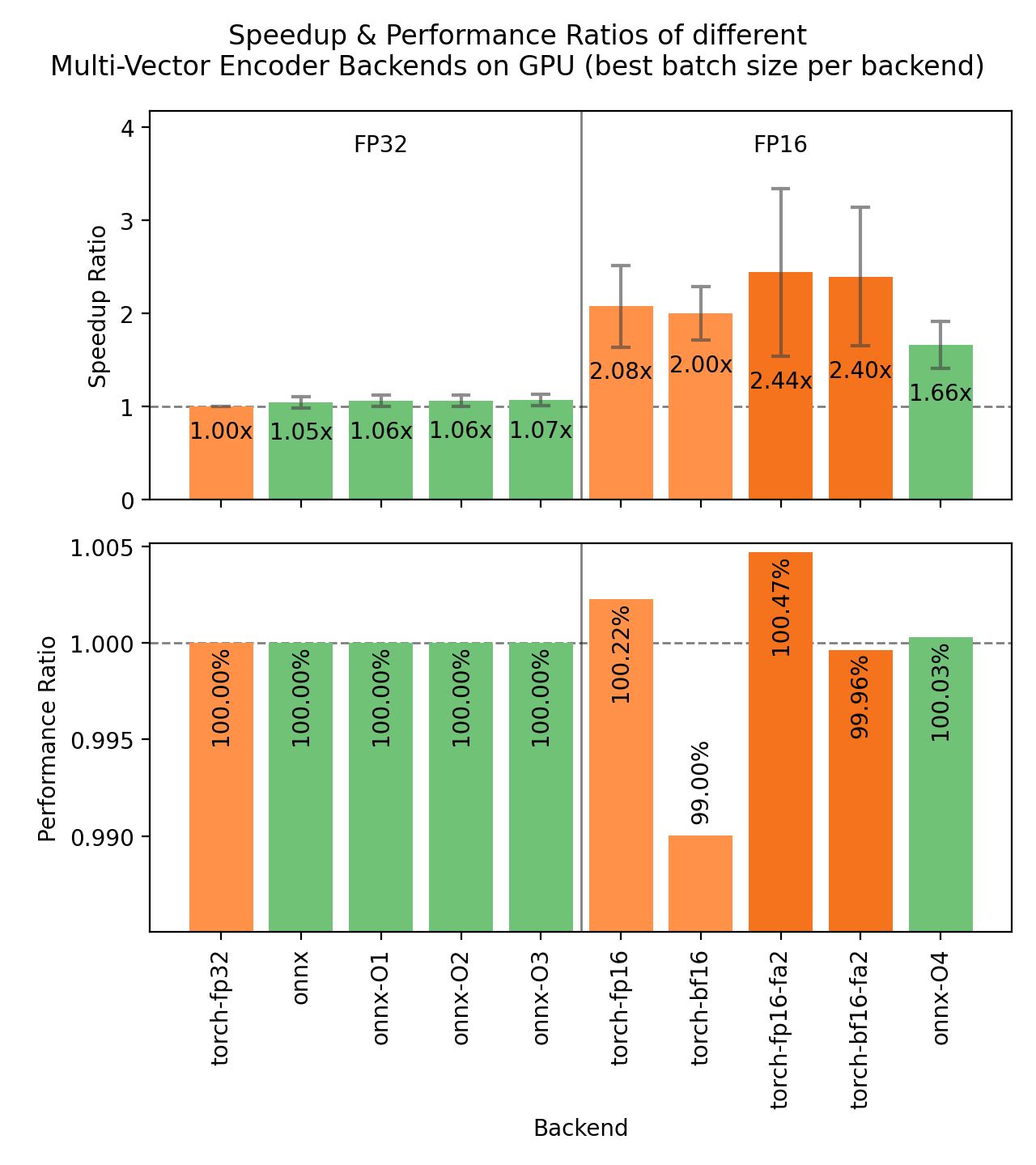
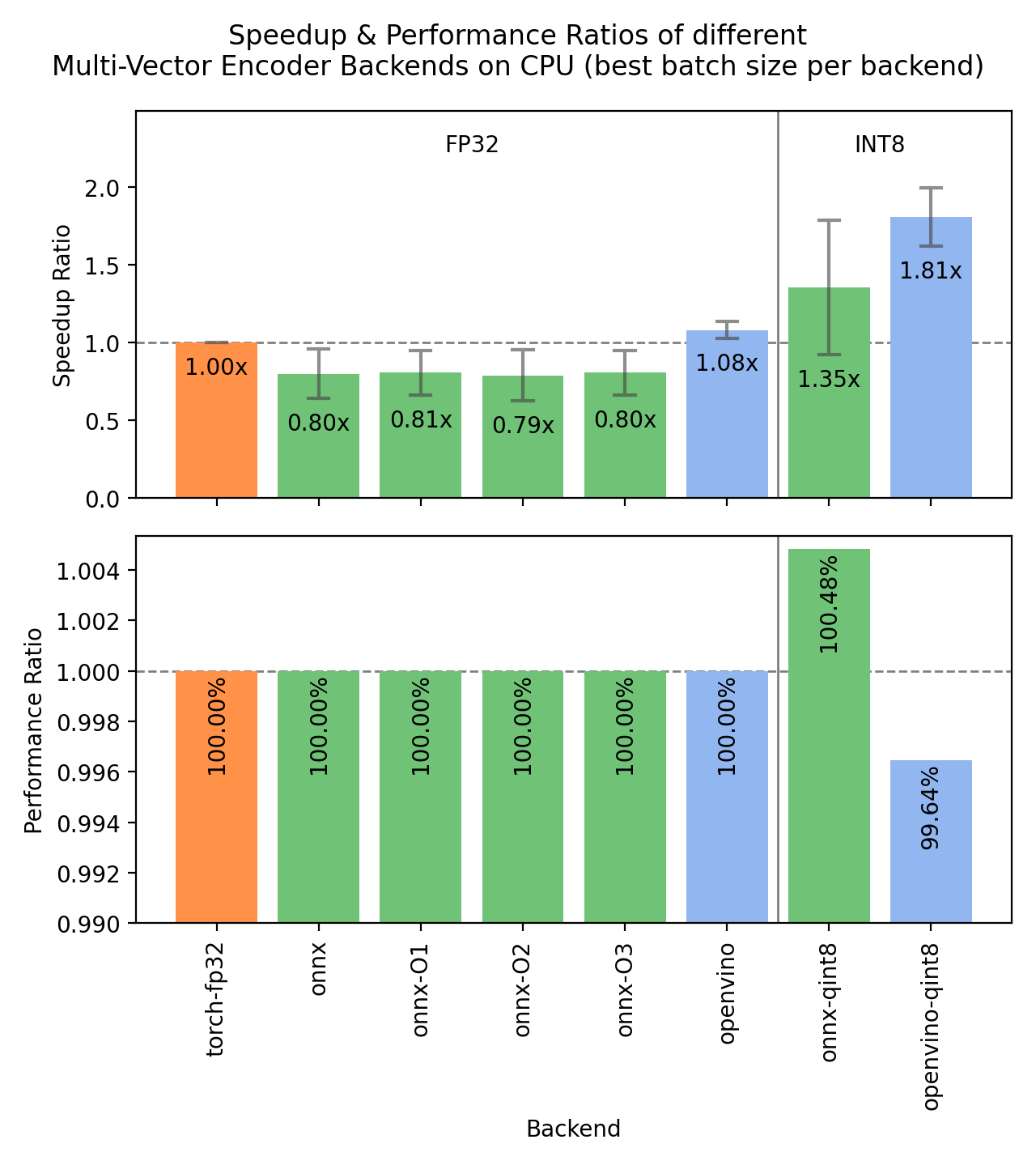
The following images show the benchmark results for the different backends on GPUs and CPUs. Each backend runs at its best batch size per model and dataset, and the bars show the median speedup over PyTorch fp32 across those combinations.
Expand the benchmark details
Speedup ratio:
- Hardware: RTX 3090 GPU, i7-13700K CPU. All measurements ran on the same Linux environment (WSL2), as mixing operating systems would skew the ratios.
-
Datasets: 2000 samples for GPU tests, 1000 samples for CPU tests, encoded as documents.
- sentence-transformers/stsb: 38.9 characters on average (SD=13.9)
- sentence-transformers/natural-questions: answers only, 619.6 characters on average (SD=345.3)
- stanfordnlp/imdb: texts repeated 4 times, 9589.3 characters on average (SD=633.4)
-
Models:
- answerdotai/answerai-colbert-small-v1: 33M parameters, BERT-based.
- lightonai/GTE-ModernColBERT-v1: 150M parameters, ModernBERT-based.
- Batch sizes: each backend is measured at increasing batch sizes (from 16 on GPU and 4 on CPU) until its throughput declines or memory is exceeded, and the ratios compare peak against peak. Columns still climbing at the largest measured batch size (mainly the Flash Attention ones) are shown conservatively. Throughput per configuration is computed from the median iteration time.
- Evaluation: NDCG@10 based on MaxSim on the MSMARCO and NQ subsets from the NanoBEIR collection of datasets, computed via the MultiVectorNanoBEIREvaluator.
-
Backends:
-
torch-fp32: PyTorch with float32 precision (default). -
torch-fp16: PyTorch with float16 precision, viamodel_kwargs={"torch_dtype": "float16"}. -
torch-bf16: PyTorch with bfloat16 precision, viamodel_kwargs={"torch_dtype": "bfloat16"}. -
torch-fp16-fa2: PyTorch with float16 precision and FlashAttention-2 with input unpadding, viamodel_kwargs={"torch_dtype": "float16", "attn_implementation": "flash_attention_2"}. -
torch-bf16-fa2: the same with bfloat16 precision. -
onnx: ONNX with float32 precision, viabackend="onnx". -
onnx-O1toonnx-O4: ONNX with optimization levels O1 to O4, viaexport_optimized_onnx_modelandbackend="onnx". O4 uses float16 precision and is GPU-only. -
onnx-qint8: ONNX quantized to int8 with "avx512_vnni", viaexport_dynamic_quantized_onnx_model(..., quantization_config="avx512_vnni", ...)andbackend="onnx". -
openvino: OpenVINO, viabackend="openvino". -
openvino-qint8: OpenVINO quantized to int8 viaexport_static_quantized_openvino_model(..., quantization_config=OVQuantizationConfig(), ...)andbackend="openvino".
-
- bf16 costs a little retrieval quality with the default SDPA attention (99.0% on average: 98.8% and 99.3%, model-specific), while fp16 is indistinguishable from fp32. bf16 with FlashAttention-2 also matches fp32 (100.0%), likely thanks to its fp32 softmax accumulation. Note that multi-vector scoring sums the MaxSim token maxima in float32: with bf16 accumulation instead, this quality drop used to be five times larger.
- fp16 with FlashAttention-2 is the best of both worlds: the highest speedup measured (2.44x) with no quality loss, making it the recommended GPU configuration when the model supports FlashAttention-2.
- The FA2 quality bar covers GTE-ModernColBERT only: models with non-attend query expansion (attend=False, e.g. answerai-colbert, Stanford-NLP checkpoints) cannot encode queries with FlashAttention-2 at all, as the expansion tokens would never receive an attention update. Their document-side encoding speed is unaffected, which is what the speedup bar measures.
- ONNX loses to PyTorch on CPU for longer texts: ONNX throughput declines as the batch size grows on the medium and long datasets, ending below PyTorch (0.80x median). OpenVINO does not show this decline: its throughput rises or stays flat everywhere. Half precision is not benchmarked on CPU here, but as for the other model types it runs many times slower than fp32 there, so avoid torch-fp16 and torch-bf16 on CPU.
-
The OpenVINO bars cover the BERT-based model only, as the OpenVINO exporter does not support the ModernBERT architecture. This is conservative: restricted to the same configurations,
onnx-qint8drops from 1.35x to 1.08x while both OpenVINO medians are unchanged, so the OpenVINO advantage is larger than the mixed bars suggest.
Recommendations
Based on the benchmarks, this flowchart should help you decide which backend to use for your model:
        %%{init: {
   "theme": "neutral",
   "flowchart": {
      "curve": "bumpY"
   }
}}%%
graph TD
A(What is your hardware?) -->|GPU| B("Does your model support<br>Flash Attention for queries?")
A -->|CPU| C("Is a 0.4% accuracy loss<br>acceptable?")
B -->|yes| D["float16 + Flash Attention"]
B -->|no| F[float16]
C -->|yes| G[openvino-qint8]
C -->|no| H("Do you have an Intel CPU?")
H -->|yes| I[openvino]
H -->|no| J[float32]
click D "#pytorch"
click F "#pytorch"
click G "#quantizing-openvino-models"
click I "#openvino"
click J "#pytorch"
Note
Your mileage may vary, and you should always test the different backends with your specific model and data to find the best one for your use case. For example, models with non-attend query expansion (such as Stanford-NLP ColBERT checkpoints) reject FlashAttention-2, and bf16 quality losses are model-specific.
User Interface
This Hugging Face Space provides a user interface for exporting, optimizing, and quantizing models for either ONNX or OpenVINO:
Note that the Space does not support Multi-Vector Encoder models yet.